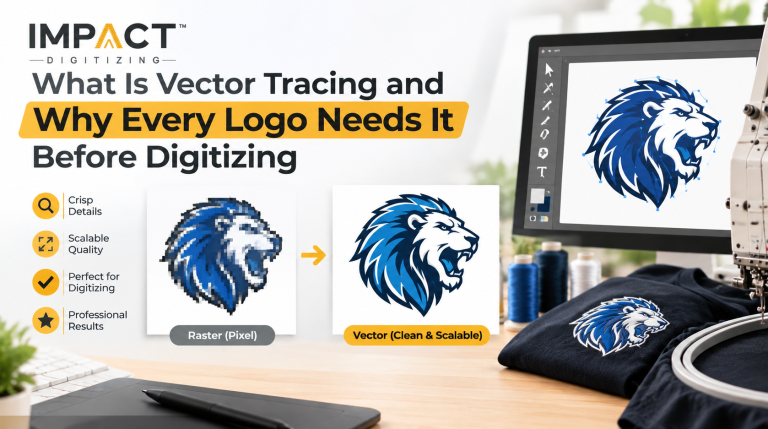
Understanding raster vs vector artwork is extremely important before you submit your custom apparel designs. Raster graphics such as JPGs make use of pixels, which can be distorted when resized, while vector graphics are based on mathematical equations. Sending in a vector file for embroidery to your digitizer will save time, confusion, and money during your custom embroidery process.
Raster vs Vector: The Basics Every Digitizing Client Should Know
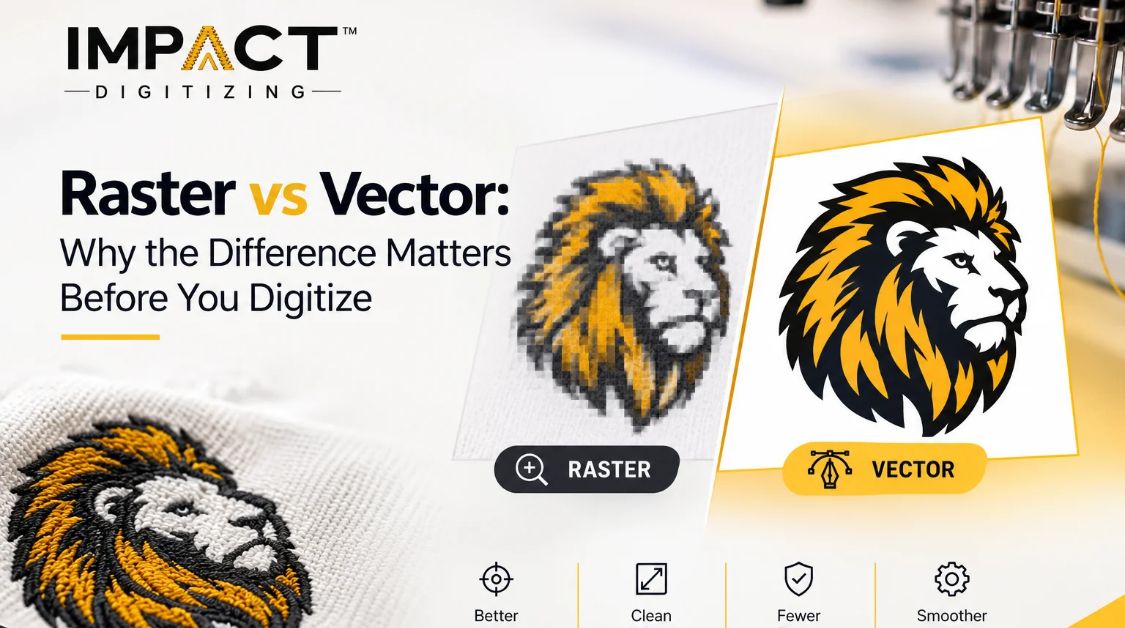
To get to know the main difference between raster and vector graphics, it is better to consider how they are built. Raster vs vector graphics are two totally different types of objects with distinct behavior because of the way in which they are built.
- Raster Images: Made up of grids of small colored squares known as pixels (JPG, PNG, and BMP, for example). Due to their resolution-dependency, they will pixelate when enlarged.
- Vector Images: These are created through mathematical equations, lines, curves, and nodes (AI, EPS, SVG). They are completely resolution-independent.
For embroidery digitizing, this distinction is critical. Digitizing software relies on crisp, distinct edges to calculate needle penetrations. Pixel blur forces automated tools to guess boundaries, leading to ragged lines. For a deeper technical breakdown, check out resources like The Embroiderer’s Guide on vector vs raster, or explore our reference on what a bitmap file is.
Quick Comparison: Raster vs Vector at a Glance
When looking at raster vs vector for embroidery, evaluating format capabilities side-by-side helps clarify why choosing the right Vector Art Services matters.
| Feature | Raster Image | Vector Image |
| Made of | Pixels | Paths/curves |
| Scalability | Loses quality when resized | Infinitely scalable |
| Common formats | JPG, PNG, BMP, GIF | AI, EPS, SVG, PDF |
| Editability | Hard to edit shapes/colors | Easy to edit shapes/colors |
| Best for digitizing? | Needs conversion first | Digitizing-ready |
| File size | Larger for great detail | Typically smaller |
Why Vector Images Are Better for Digitizing
Knowing why vector images are better for digitizing helps streamline your workflow from the moment you submit an order. Clean mathematical paths translate directly into accurate stitch outlines without guesswork.
- Exact Color Mapping: Vector files preserve distinct color blocks, making it seamless to match specific thread charts.
- Zero Pixelation: No fuzzy artifact boundaries will complicate the process of auto-tracing and manual tracing.
- Fewer Revisions: Clean outlines will lead to less time spent on revisions, which will make the whole process more efficient.
As noted in industry studies by Affordable Digitizing, starting with proper vector assets eliminates common production bottlenecks. Learn more about the benefits of using vector graphics in design to optimize your brand assets.
Raster vs Vector for Embroidery: What Happens at the Stitch Level
Evaluating raster vs vector for embroidery ultimately comes down to physical execution on a multi-head machine. When a client submits a low-resolution raster image, the experienced digitizer must trace the fuzzy pixels manually before programming the stitch information.
Using clear vector images for embroidery digitizing allows technicians to use the exact density, underlay, and pull compensation that is needed for the fabric. High-quality vector art for embroidery is not just additional but essential for the final result of stitching quality and even tension of the edges. If you are working with alternative image types, read our technical review on Is TIFF a Vector Format? to ensure your format is supported.
How to Convert Raster to Vector Before Sending Your File
Learning how to successfully convert raster to vector formats before sending your files to production saves significant time and prevents unexpected art fees.
- Manual Tracing: The gold standard. Performed by professional graphic artists using software like Adobe Illustrator to redraw clean anchor points and curves.
- Auto-Trace Tools: Fast and convenient, but often create messy node clusters that complicate fine text and intricate logo details.
If you are not sure what to do with the bitmap file, let us deal with it. Read our guides about converting raster to vector: full guide, JPG to Vector Conversion, and How to Convert PDF to Vector Image.
Best Image Format for Embroidery Digitizing
Selecting the best image format for embroidery digitizing guarantees that your order will go directly from uploading to production without any administrative process.
- Preferred Formats: AI, EPS, SVG, and vector PDF files.
- Acceptable Formats: High-resolution PNG images (more than 300 DPI, clean transparent background).
- Formats to Avoid: Low-resolution JPG files, smartphone pictures, and compressed images from social networks.
Before uploading your design to our Embroidery Digitizing Company, make sure that you have done a small verification regarding your file resolution and edge sharpness.
Common Mistakes Clients Make With Raster Files
Even expert brand managers often face problems due to the lack of difference between raster and vector images. Awareness of these typical mistakes will help you prevent production delays:
- Stretching a low-resolution web logo and assuming high-end software can magically sharpen the pixels.
- Treating any PNG file as “digitizing-ready” simply because the background happens to be transparent.
- Ignoring tiny lettering or complex gradient overlays that collapse into unreadable thread clumps at small scales.
By spotting these problems early, you can make the production process easier and ensure your clothing launches happen on time.
Conclusion
Using clean vector files is the key to perfect embroidery. By avoiding mistakes with pixels and tracing, you get clear stitch lines, correct colors, and faster production times with Impact Digitizing. Get your artwork ready today to create your custom clothing designs accurately.
FAQs
What is the difference between raster and vector images?
Raster uses pixel grids that blur when resized; vector uses mathematical paths that scale infinitely.
Why do embroidery digitizers prefer vector files?
Vector files have sharp edges and precise anchor points and no need to guess pixels for accurate embroidery.
Can a raster image be converted to vector for embroidery?
Yes, raster images can be converted to vectors either manually or by the use of software.
What file formats count as vector formats?
There are AI, EPS, SVG, and vector PDF files among other file formats.
Why does a JPG logo look blurry once it’s digitized?
Low-resolution JPGs lack clear lines and need the software to fill the gaps, making rough lines.
Can I send a raster (JPG/PNG) image straight for embroidery digitizing?
Yes, but a high-resolution PNG with a transparent background is preferred; a low-resolution JPG needs manual tracing before digitization.
Which vector format is best for embroidery digitizing?
AI and EPS are considered the industry standard for embroidery digitizing.