Choosing the correct digitization technique can determine whether your embroidery project will be successful or result in wastage of time and money. At its core, the debate between manual vs. auto digitizing depends on how well the digital image is converted into machine-readable formats such as DST, PES, or EXP. Both methods involve converting the artwork into stitch data, but it’s actually about good path planning.
What Is Manual vs Auto Digitizing?
The conversion procedure determines how the needles will traverse through the fabric during manufacturing. Understanding the workings of each technique allows for an understanding of when to depend on software and when to use human skills:
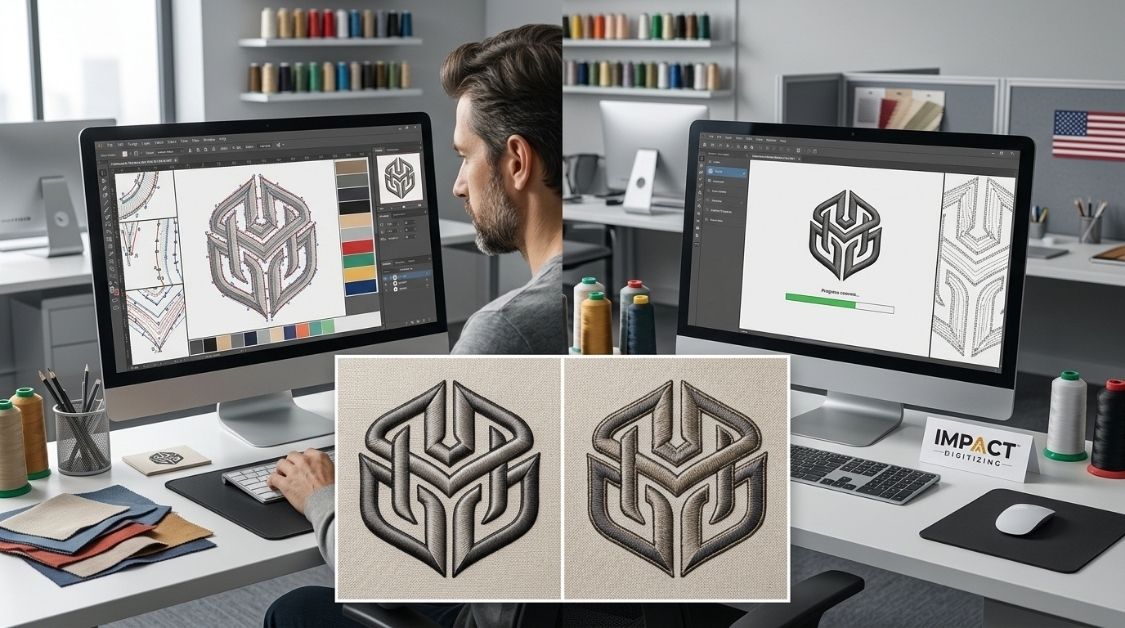
- Manual Embroidery Digitizing: An experienced technician manually maps out every stitch, angle, and density setting.
- Automatic Digitizing: The embroidery digitizing software evaluates shape patterns and generates paths automatically.
Both methods output standard embroidery files, but the variance in stitch quality is substantial. To explore more about the programs behind these methods, check out our guide on the Best Programs to Digitize Embroidery Designs.
Quick Comparison: Manual vs Auto Digitizing at a Glance
Selecting an appropriate approach depends on design difficulty, fabric choice, and production volume.
| Factor | Manual Digitizing | Auto Digitizing |
| Stitch path control | Full control by digitizer | Algorithm-decided |
| Best for | Logos, small text, complex art | Simple shapes, bulk/basic designs |
| Turnaround | Slower, hands-on | Fast, near-instant |
| Editing needed after | Minimal | Often required (density, underlay) |
| Typical embroidery quality | High, consistent | Variable, design-dependent |
| Cost | Higher (skilled labor) | Lower (software-driven) |
Note: Turnaround times and pricing tiers vary based on artwork scale. For specific service lines, explore our core Manual Digitizing and auto-routing workflows.
How Manual Embroidery Digitizing Works
True manual embroidery digitizing is an art form rooted in understanding tension, fabric stretch, and needle physics. A professional embroidery digitizer traces artwork step-by-step, meticulously defining parameters for seamless production.
- Granular Control: Precise management of entry points, pull compensation, and sequence orders prevents puckering on delicate fabrics.
- Reduced Errors: Minimized jump stitches and unexpected thread breaks result in cleaner, retail-ready garments.
- Ideal Applications: Perfect for brand logos, retail apparel, and long commercial production runs.
Verdict: The absolute best choice for brand logos and garments destined for commercial production lines where embroidery quality is paramount.
How Automatic Embroidery Digitizing (AI Digitizing) Works
Modern automatic embroidery digitizing has evolved rapidly, allowing users to upload graphics and generate stitches in seconds using advanced AI embroidery digitizing capabilities. If you want to explore the latest technology in this space, take a look at our roundup of the Best AI-Powered Embroidery Digitizing Tools.
- Algorithm-Driven: Auto-digitizing tools scan pixels or vector outlines to assign satin fills and density parameters automatically.
- Speed: Highly useful when volume and rapid turnaround matter more than micro-details.
- Limitations: Software usually has a hard time with gradients, small text, and overlapping parts unless a person fixes them.
Verdict: A helpful digital drawing tool, but it usually needs some fixing before it can be sold.
Manual vs Auto Digitizing: Stitch Quality Compared
When weighing manual vs auto digitizing, the ultimate deciding factor is how the garment looks and feels after coming off the machine. Automated systems handle fabrics quite differently than human specialists.
- Automated Over-Compensating: Software often packs too many stitches into a small area, creating a stiff, bulletproof patch that puckers lightweight cotton or performance tees.
- Dynamic Adjustments: Professional embroidery digitizing takes fabric behavior, stretch, and stress points into account.
- Consistency: Human workers make sure the embroidery looks good, which helps machines run smoothly and lowers fabric waste.
Learn more about avoiding pitfalls in our guide on Common Mistakes in Digitizing Projects.
Common Errors in Auto Digitizing Software
Relying entirely on auto digitizing software without review can lead to frustrating production errors. Even top programs don’t have the same intuition as humans when dealing with difficult materials.
- Over-Dense Stitching: Creates thick, heavy spots that make clothes uncomfortable to wear.
- Misalignment Gaps: Thin text and sharp color edges can sometimes get fuzzy or unclear.
- Inefficient Jump Stitches: Failing to clean up connectors results in excessive machine trimming time.
If you are comparing software ecosystems before committing to a platform, review industry standards like Wilcom vs Hatch vs Pulse.
When Auto Digitizing Software Is the Right Call
There are times when speed trumps microscopic perfection. Automated and AI digitizing tools serve a distinct, practical purpose in the embroidery workflow.
- Simple Shapes: Basic, solid-color vector artwork or simple monograms.
- Hobby Projects: Small personal tasks where little mistakes don’t hurt a brand’s image.
- Stable Substrates: Thick canvas, denim, or stiff non-stretch fabrics.
Verdict: Great for quickly making models and fun projects, but not safe for business logos.
When You Need Professional Manual Logo Digitizing
Corporate apparel, custom hats, and retail merchandise demand a higher standard. Investing in manual logo digitizing ensures your brand identity translates cleanly onto fabric.
- Corporate Branding: Fancy color choices, tiny logos, and intricate company symbols.
- Technical Garments: Hats, jackets, and flexible sports clothes that need special stitching underneath.
- Manufacturing Scale: Making a lot of clothes at once, where one small mistake can affect many pieces.
Verdict: Professional oversight is well worth the investment to protect your fabric and equipment.
Cost & Turnaround: Manual vs Auto Digitizing
| Feature | Auto Digitizing | Manual Digitizing |
| Typical Turnaround | Minutes to hours | Same-day to 24–48 hrs |
| Editing Required | Often, before production | Rarely |
| Cost per Design | Lower upfront | Higher upfront |
| Rework/Reject Risk | Higher on complex art | Lower |
| Best Value For | Bulk simple designs | Logos & brand work |
While auto-generated files look cheaper initially, machine downtime, thread breaks, and ruined garments quickly close the price gap. A clean manual file that stitches right the first time is often the most cost-effective route.
Conclusion
As fast as auto-digitizing can be for simple and static projects, manual digitizing comes out on top for quality work. Partnering with Impact Digitizing for manually created artwork will help preserve your fabric investment while keeping your machines running smoothly and safeguarding your brand’s reputation.
FAQs
Is manual digitizing better than auto digitizing
Yes, manual digitizing offers far superior stitch quality, precision, and reliability for professional apparel.
Does AI replace embroidery digitizers?
No, AI serves as a basic drafting tool but lacks human intuition for complex fabrics and details.
Which method produces better embroidery quality?
Manual digitizing consistently produces cleaner, high-end embroidery without puckering or thread breaks.
Is auto digitizing accurate?
Only for simple shapes; it often creates messy paths, misaligned edges, and over-dense stitching on detailed art.
Why do professionals prefer manual digitizing?
Professionals rely on manual control to manage fabric stretch, underlay settings, and flawless pull compensation.
Can beginners use auto digitizing software?
Yes, beginners use it for quick drafts, but files usually require manual cleanup before stitching.
Which software has auto digitizing?
Popular embroidery suites like Wilcom, Hatch, and PE-Design feature built-in auto-punch or auto-tracing tools.
Is manual digitizing worth the extra cost?
Absolutely; it prevents ruined garments, machine downtime, and costly production errors on large runs.